Family Tree as a School Project: A Complete Guide for Students and Parents
A family tree school project is one of the most popular assignments given to students in primary and middle school. It helps children learn about their relatives, understand generations, and develop research, communication, and presentation skills. More importantly, it encourages meaningful conversations between children, parents, grandparents, and other family members.
If your child has been asked to make a family tree for school, this guide will help you plan the project from start to finish. We will cover simple steps, examples, creative ideas, interview questions, and digital tools that make the assignment easier and more enjoyable.
What Is a Family Tree?
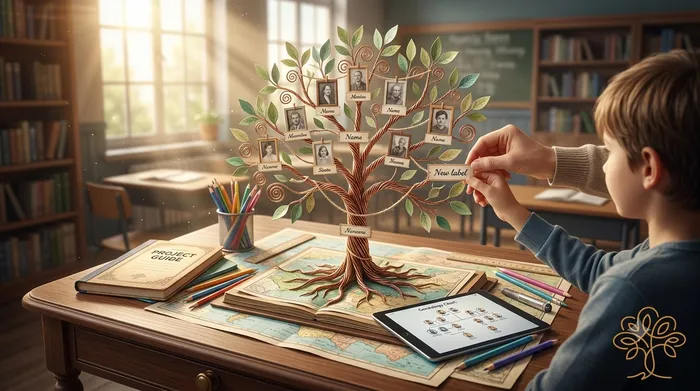
A family tree is a visual chart that shows how family members are related to one another across generations. It usually begins with the student and extends upward to parents, grandparents, and great-grandparents.
A basic school family tree may include:
- Student
- Parents
- Siblings
- Grandparents
- Great-grandparents (if information is available)
The chart can be drawn on paper, created as a poster, or designed digitally.
Why Schools Assign Family Tree Projects
Family tree projects support several educational goals.
Learning About Family History
Students discover where their family comes from, what languages they speak, and what traditions they follow.
Understanding Generations
Children learn terms such as parent, grandparent, great-grandparent, aunt, uncle, and cousin.
Building Research Skills
Students practice gathering information from interviews, documents, photographs, and family stories.
Improving Communication
Talking with older relatives helps children ask questions, listen carefully, and record information accurately.
Encouraging Creativity
Designing a family tree allows students to use colors, drawings, photos, and decorative elements.
Step-by-Step Guide to Making a Family Tree
Step 1: Decide the Number of Generations
Ask the teacher how many generations are required. A common school project includes three generations:
- Grandparents
- Parents
- Student and siblings
If more information is available, you can add great-grandparents.
Step 2: Gather Information
Create a list with:
- Full names
- Relationship to the student
- Birth year or birthday
- Place of birth (optional)
- Photograph (optional)
Step 3: Interview Family Members
Talk to parents and grandparents. Write down their answers carefully.
Step 4: Draw the Structure
Start with the oldest generation at the top and move downward to younger generations.
Step 5: Add Details
Include names, photos, symbols, or short notes such as hobbies, occupations, or favorite foods.
Step 6: Decorate the Project
Use colored paper, stickers, leaves, flowers, or family-themed drawings.
Simple Family Tree Example
Here is a basic structure for a school project:
Great-Grandparents
        |
Grandparents
        |
Parents
        |
Student and Siblings
This format is easy for young children to understand and present in class.
Materials Needed
For a Paper Poster
- Chart paper or poster board
- Pencil and eraser
- Scale or ruler
- Colored pens or markers
- Glue
- Printed family photos
For a Digital Project
- Computer, tablet, or phone
- Presentation software or an online family tree tool
A digital tree is especially useful when relatives live in different cities or countries.
Creative Family Tree Ideas for School
Tree-Shaped Poster
Draw a large tree trunk and place each family member’s name on a leaf.
Photo Family Tree
Paste small photographs instead of writing names only.
Handprint Tree
Use painted handprints as branches and write names on each finger.
Cultural Heritage Tree
Add flags, traditional clothing, languages spoken, or hometowns beside each relative.
Timeline Tree
Include important years such as births, marriages, or migration dates.
Questions Students Can Ask Relatives
Encourage children to ask simple and respectful questions.
- What is your full name?
- When were you born?
- Where were you born?
- What was your school like?
- What games did you play as a child?
- What family tradition do you remember most?
- Who was the oldest person you knew in our family?
- Do you have any old photographs or stories to share?
These questions often lead to wonderful family stories that can be added to the project.
What to Write Beside Each Name
For a neat and informative project, use a small format such as:
- Name: Meera Patel
- Relation: Grandmother
- Born: 1958
- Hobby: Gardening
Keep the text short so the poster remains easy to read.
Family Tree Project for Different Age Groups
| Age Group | Suggested Project |
|---|---|
| 5–7 years | Names and drawings only |
| 8–10 years | Names, photos, and birth years |
| 11–13 years | Add occupations, places, and short stories |
| 14+ years | Research multiple generations and create a digital presentation |
Choose a level that matches the student’s age and school requirements.
How to Present the Project in Class
Students can prepare a short presentation of one or two minutes.
Sample Presentation
“Hello everyone. This is my family tree. At the top are my grandparents. Below them are my parents. Here are my brother and me. My grandmother loves gardening, and my grandfather was a teacher. I learned many interesting stories while making this project.”
Practicing the presentation at home helps children feel confident.
Common Mistakes to Avoid
- Spelling names incorrectly
- Mixing up maternal and paternal relatives
- Using handwriting that is difficult to read
- Adding too many decorations that hide the information
- Forgetting to ask permission before using family photos
- Leaving relationships unlabeled
A clean and accurate project usually scores better than an overly complicated one.
Making a Family Tree Digitally
Many families now prefer digital family trees because they can be updated easily and shared with relatives. A digital tree also prevents damage to printed posters.
You can create and organize your family tree online with MyRooots.
Helpful Tools for Students and Parents
- Family Tree Generator: Create a visual family tree quickly.
- Relationship Calculator: Find how two relatives are related.
- Ancestor Timeline Generator: Arrange family events in chronological order.
These tools can help students build a neat, accurate, and easy-to-understand project.
Add a Fun Learning Activity
After completing the family tree, students can explore birthdays and zodiac signs of family members. This can become a fun classroom discussion about similarities and differences within families.
Try the Zodiac Compatibility Tool with family members, friends, or classmates for an additional learning activity.
Educational Benefits Beyond the Assignment
A family tree project teaches more than family names. Children often develop:
- Respect for elders
- Curiosity about history
- Listening skills
- Record-keeping habits
- Pride in family traditions
- A sense of identity and belonging
Many parents are surprised by how much children enjoy hearing stories from grandparents during the project.
A Simple Project Checklist
Before submitting the assignment, check the following:
- All names are spelled correctly.
- Relationships are clearly labeled.
- Generations are arranged from oldest to youngest.
- Photos are attached securely.
- The title is visible.
- The student’s name and class are written on the project.
- The presentation has been practiced.
Conclusion
A family tree school project is much more than a homework assignment. It is an opportunity for children to discover their roots, connect with relatives, and preserve family memories for the future. Whether the project is made on chart paper or created digitally, the most important part is the conversation and learning that happen during the process.
Start by gathering family names and stories, choose a simple design, and enjoy creating a project that celebrates your family’s unique history. For an easy digital option, explore MyRooots and use the Family Tree Generator to build a beautiful family tree that can be updated for years to come.
Create Your Family Tree for Free
Start building your family history in minutes with the My rOoOts Free Family Tree Creator. Add parents, grandparents, children, and relatives, organize generations visually, and create a beautiful family tree that you can save and share.
👉 Create your free family tree: Free Family Tree Creator
No design skills required. Simply enter your family details and generate a clear, easy-to-read family tree online for free.
Check Zodiac Compatibility for Any Two People
Curious about how well two people match based on their date of birth? Try the My rOoOts Zodiac Compatibility Tool to compare zodiac signs, explore relationship compatibility, and get a quick compatibility score for couples, friends, or family members.
👉 Check compatibility now: Zodiac Compatibility Calculator
You can enter two dates of birth and even mention the relationship type to get a more personalized compatibility result.
Download a Free Family Tree Template
Want to draw your family tree yourself? The My rOoOts Family Tree Template provides a free printable blank pedigree chart for documenting your family history across multiple generations.
👉 Download a free family tree template: Family Tree Template
Choose a 3-generation, 4-generation, or 5-generation family tree template and save it as a PDF for printing, writing, and documenting your ancestors.
Discover the Meaning and Origin of Your Surname
Ever wondered where your family name came from? Use the My rOoOts Surname Meaning Lookup to explore surname meanings, origins, history, and etymology from different regions and cultures around the world.
👉 Discover your surname meaning: Surname Meaning Lookup
Learn more about your last name and explore the possible linguistic, geographic, cultural, and historical roots behind your family surname.
Start your family tree free
No account needed to begin. Build it in minutes, then save it whenever you're ready.
Build your family tree